Editorial note: camera features and subscriptions change often. This guide uses current manufacturer specifications and enclosure-specific risks. Confirm storage, app requirements and privacy controls before buying.
Verdict: Wyze Cam v4 is the best value starting point for a wired reptile enclosure camera when local microSD storage and a wide view matter. Tapo’s compact indoor cameras are a sensible alternative for simple local recording. A pan-and-tilt model can cover a large room, but a fixed camera usually causes fewer reflections when shooting through glass.
The hardest problem is not resolution. It is placing the camera where infrared light does not bounce off glass, the cable cannot create an escape gap and the animal still has a private retreat.
What to compare
| Feature | Why it matters in an enclosure |
|---|---|
| Field of view | A close camera needs a wide lens to see the full habitat |
| Infrared control | Built-in IR reflects from glass and can wash out the animal |
| Local storage | Reduces subscription dependence and keeps long clips on site |
| Continuous recording | Motion detection often misses slow reptile movement |
| Mounting | The camera must stay aligned without exposed adhesive or escape gaps |
| Status lights and spotlight | Bright LEDs can disturb night conditions |
| Privacy controls | An indoor camera can capture people, voices and room routines |
Wyze Cam v4
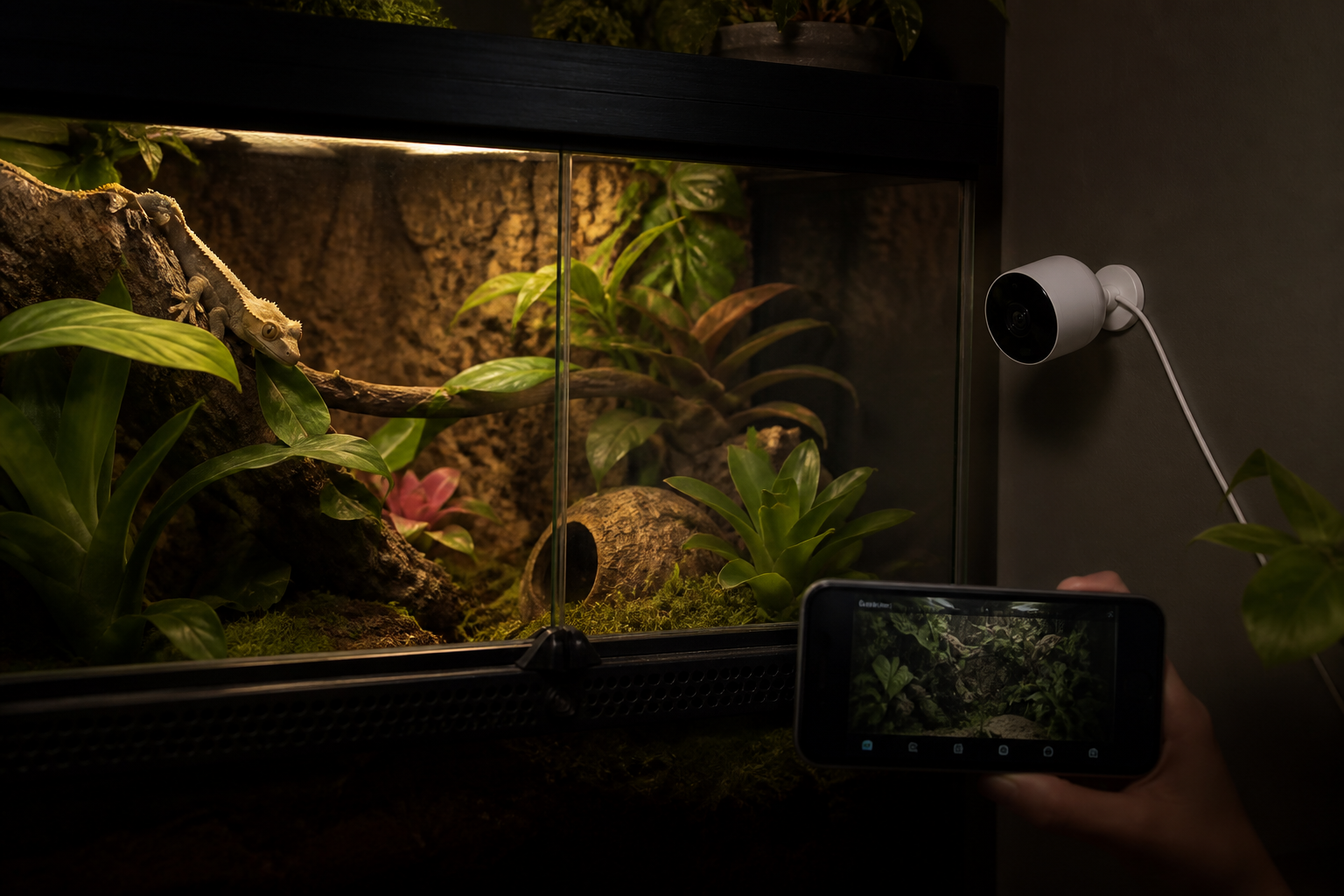
Wyze lists 2560 by 1440 video, a 115.8-degree diagonal field of view, 850 nm infrared LEDs, color night vision, a 6-foot power cable and local microSD support. It uses 2.4 GHz Wi-Fi and can record to local storage without making every clip a cloud purchase.
The compact body and broad view suit an enclosure, but the spotlight, siren, status light and two-way audio should be disabled unless there is a specific reason to use them. The published IP65 rating does not mean the power adapter and indoor cable routing belong in a wet vivarium.
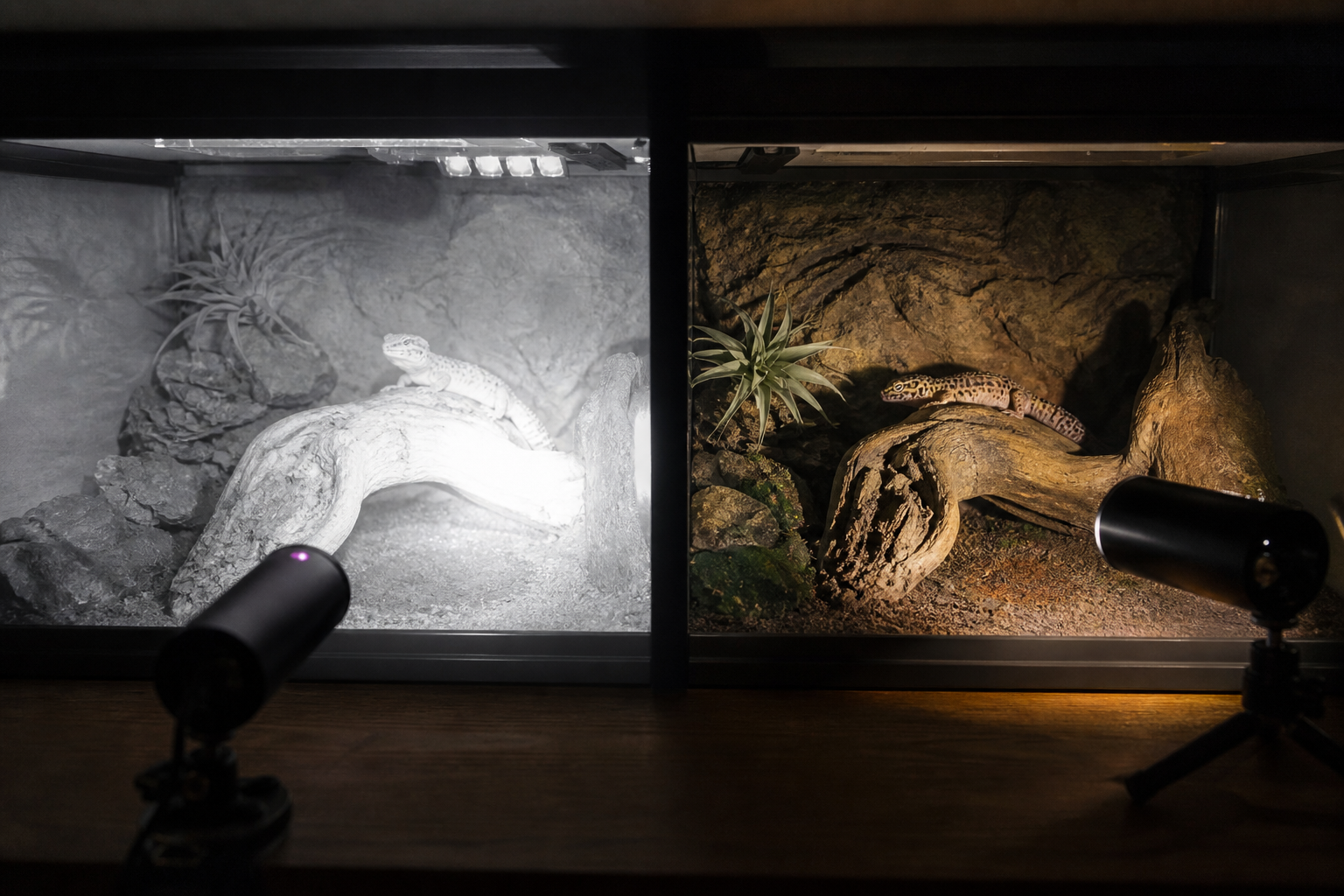
Through glass, turn the camera’s own IR off and test with room-side infrared illumination placed so its reflection misses the lens. Color night vision needs some ambient light. Do not add visible night lighting merely to improve video without considering the animal.
Tapo compact indoor cameras
TP-Link Tapo C100 and related fixed models are inexpensive, support local microSD recording and provide infrared night vision. Their fixed bases are easy to mount on a shelf. Check the current card limit and whether continuous recording remains available without a subscription on the exact model.
The same glass problem applies. A cheaper camera with IR disabled and carefully placed external illumination can outperform a premium model pressed against reflective glass.
Pan-and-tilt cameras
A pan camera such as Wyze Cam Pan can watch several enclosures or follow a large habitat. Movement tracking sounds useful, but motors can attract attention, create noise and lose the desired framing. Reflections also change as the lens turns.
Use pan-and-tilt for a room overview or a very large enclosure. Use a fixed camera for a close glass-front view where alignment matters more than coverage.
Inside or outside the enclosure?
Outside is safer in most cases. The camera avoids humidity, heat, waste and direct animal contact. Power stays outside too. The price is glass reflection and a little lost detail.
An internal camera should be used only when its environmental rating, cable routing and mount are appropriate. A snake can wrap around a cable or push a loose camera. A gecko can soil the lens. An exposed microSD door is not a waterproof seal.
Never widen a cable port so far that it becomes an escape path. Never leave a USB cable pinched in a sliding door. If the safe route is not obvious, keep the camera outside.
How to remove night-vision glare
- Clean both sides of the viewing glass.
- Place the lens close and square to the glass, with a dark surround.
- Turn off the camera’s internal infrared LEDs.
- Move an external IR illuminator to the side or above so its reflection does not return to the lens.
- Test with enclosure lights off and room lights in their normal state.
- Check every corner for a bright reflection or hidden area.
Black fabric or a small hood around the lens can block room reflections, but keep fabric away from heaters and ventilation. A removable foam shade on the room side is safer than adhesive inside the habitat.
Motion detection misses reptiles
Many cameras are tuned for people, pets and fast movement. A snake moving slowly across a warm hide or a gecko remaining still for minutes may not create an event. Motion zones and sensitivity help, but they should be tested with the actual animal routine.
Use continuous local recording when the question is behavioral review. Event clips are fine for alerts, not for proving that nothing happened. Large memory cards need endurance ratings and periodic playback checks.
Storage and subscriptions
Local microSD is the simplest way to avoid monthly cloud cost. Check whether the camera supports continuous or event-only recording, how old files are overwritten and whether clips can be exported without removing the card.
Cloud plans add off-site history and smarter detection, but they also upload indoor video. Read retention and deletion settings. A plan can change after the hardware is installed, so buy a camera that remains useful with local storage.
Privacy in a reptile room
A camera aimed at an enclosure may capture people, conversations, veterinary paperwork and computer screens. Disable the microphone if audio is unnecessary. Use a unique account password, multi-factor authentication and the smallest sharing list.
Do not publish a live stream that reveals home routines or valuable animals. If a clip is shared, trim it and inspect the background. The principles in the data and privacy checklist apply to camera apps too.
Power and heat safety
Route the low-voltage cable outside the habitat and keep the mains adapter away from misting. Use a drip loop. Do not place a camera or cable on a lamp guard, radiant heater or warm ventilation grille.
Measure the mounting location during the hottest part of the cycle and compare it with the camera’s operating range. The temperature monitoring guide explains how to log a local hot spot rather than guessing from the room temperature.
Seven-day camera test
- Mount outside the finished enclosure with temporary safe supports.
- Check the full field in daylight and darkness.
- Disable lights, siren and audio that are not needed.
- Test internal IR on and off, then adjust external illumination.
- Verify motion detection against slow movement.
- Record continuously to microSD and export a sample clip.
- Disconnect Wi-Fi and power separately to learn recovery behavior.
- Inspect cable, heat, condensation and privacy settings.
Which camera should you buy?
Choose Wyze Cam v4 for a compact wide view, detailed video and flexible local storage. Choose Tapo for a simple budget camera in an ecosystem you already use. Choose a pan camera for room coverage, not because tracking sounds impressive.
Skip the camera when a safe mount or cable route would compromise the enclosure. Monitoring is useful only when it does not add a new hazard.
Mounting positions that preserve useful detail
Start outside the enclosure at a slight angle to the glass. A straight-on view is easy to frame but more likely to show room reflections. Keep the lens close enough to reduce reflections without allowing the camera body to touch a warm panel or block ventilation. Use a stable shelf or mechanical mount rather than adhesive alone near heat and humidity.
Frame the locations that answer a question: the basking shelf, water bowl, hide entrance or nesting area. One wide shot rarely shows all of them well. Before adding a second camera, move the first for a week and compare which view produces information you actually use.
Build a review routine for recordings
Continuous footage becomes useless if nobody reviews it. Choose short windows tied to behavior, such as the first hour after lights out or the period after feeding. Save only clips that document a change, equipment issue or health observation. Add the date and animal identifier to the filename.
A camera timeline is not a husbandry record by itself. Link important clips from the animal’s existing notes and record what the footage changed. For structured records, compare the workflows in our guide to the best reptile tracking apps.
Network isolation and account security
Use a unique password and enable multi-factor authentication when the camera service offers it. Keep firmware and the mobile app current. A separate guest or IoT network can limit what a compromised device reaches, provided the camera still receives updates and the phone can connect when needed.
Review shared-account access after staff, sitters or family members no longer need it. Disable unused cloud trials and confirm whether local recording continues without a subscription. If the camera watches more than the enclosure, reposition it or define privacy zones before storing footage.
Frequently asked questions
Can a camera see through terrarium glass at night?
Yes, but built-in IR often reflects into the lens. Disable it and reposition external infrared illumination.
Should the camera be inside the enclosure?
Usually no. External mounting protects the camera and animal and keeps power outside.
Do I need a subscription?
Not when the chosen model supports the required local microSD recording. Cloud features and smart detection may still require a plan.
Will motion alerts detect a snake?
Not reliably. Test sensitivity and use continuous recording when slow behavior matters.